If your YouTube channel has been suspended and you’re feeling overwhelmed, you’ve come to the right place. Losing a channel means losing your hard work, your audience, and—if you were monetized—your income. However, a suspension isn’t always permanent. In this guide, we will walk you through the exact process of recovering a suspended YouTube channel.
While many users face termination due to various policy violations, following the correct appeal process can significantly increase your chances of getting your account back. Let’s dive into how you can fix this.
Why Does a YouTube Channel Get Suspended?
YouTube doesn’t usually terminate accounts without a reason. Typically, a suspension occurs because of a violation of their core policies. The most common reasons include:
- Community Guidelines Violations: Repeatedly uploading content involving spam, nudity, hate speech, or harmful/dangerous activities.
- Copyright Issues: Using someone else’s videos or music without permission. If you receive three copyright strikes, your channel is automatically terminated.
- Terms of Service (ToS) Violations: General or repeated abuse of YouTube’s platform rules.
First Steps: What to Do Immediately After Suspension
As soon as your channel is suspended, your first move should be to check your registered email inbox. YouTube will send an automated notification explaining the primary reason for the termination.
Pro Tip: Look for your Channel URL in that email. Copy it and save it in a safe place (like a Notepad or Google Doc). You will absolutely need this link to file an appeal.
How to Appeal via YouTube Studio
If you still have limited access or a specific prompt in your mobile app, you can appeal directly through the interface:
- Open the YouTube Studio app on your phone or computer.
- You will see a notification regarding the Termination Info. Click on Begin Review.
- Read through the reasons cited by YouTube carefully, then click Next.
- Select the Start Appeal option.
- Enter your contact email address and provide a detailed, logical reason why you believe the suspension was a mistake.
- Click Submit to finish the process.
Using the Direct Appeal Form
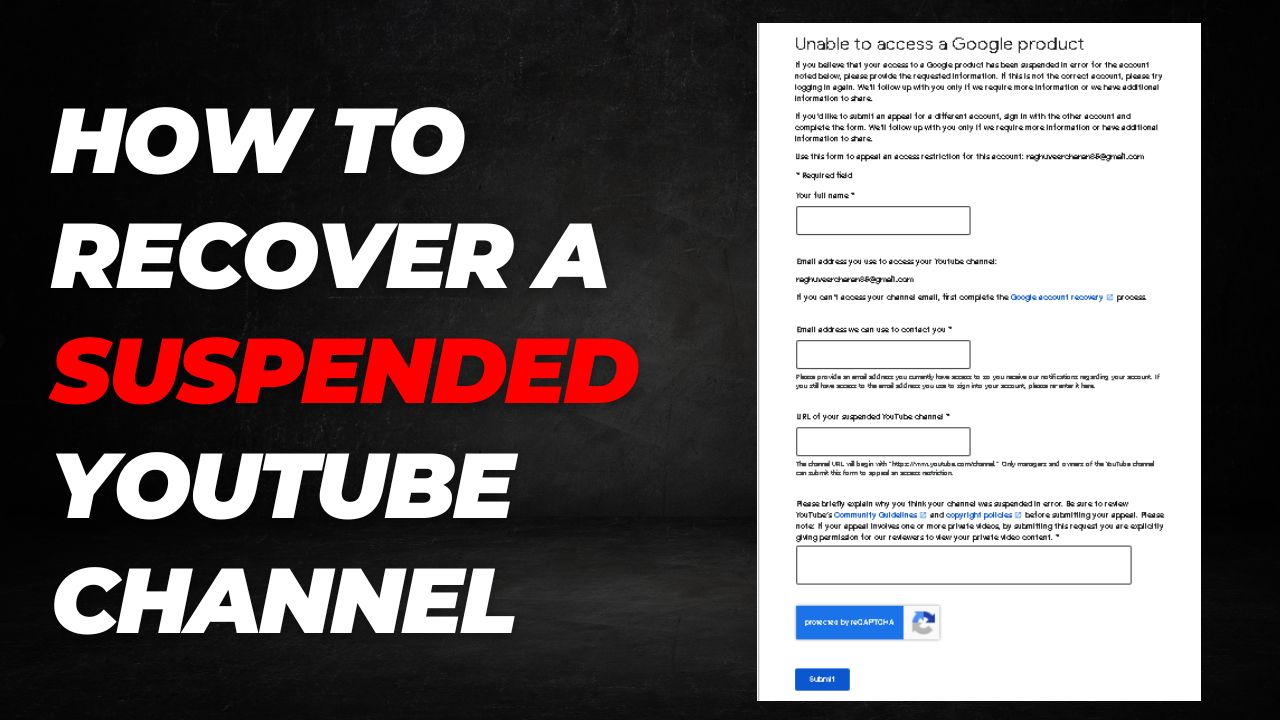
If you cannot access YouTube Studio at all, you must use the official Google contact form. This is often the most effective way for suspended users to reach the support team.
- Visit the official Google Appeal Form.
- Full Name: Enter your legal name associated with the account.
- Email address: Provide the email used for the channel and an alternative email where they can reach you.
- URL of your suspended YouTube channel: Paste the channel link you saved earlier.
- Explanation: Provide a clear, polite, and factual reason why your channel should be reinstated.
- Solve the captcha and click Submit.
What if the Suspension is Due to Copyright?
If your channel was terminated due to Copyright Infringement, the standard appeal form will likely not work. In this case, you must contact the person or entity who filed the strikes against you. You can request a Retraction. If they agree to remove the strikes, YouTube will automatically restore your channel.
Professional Appeal Format (Template)
If you believe your channel was flagged by mistake, use this professional template for your appeal. Be sure to fill in your specific details.
Dear YouTube Support Team,
I am writing to appeal the recent suspension of my YouTube channel, [Insert Channel Name]. My channel URL is: [Insert Channel URL].
I have thoroughly reviewed the YouTube Community Guidelines and Terms of Service. I firmly believe that my content does not violate policies regarding spam, scams, or commercially deceptive content. I have always strived to create original and helpful content for my community.
It is possible that my channel was incorrectly flagged by the automated system. I kindly request a manual review of my channel and uploaded videos. If there was a specific error on my part, please let me know so I can correct it immediately.
I am committed to maintaining a safe and positive environment on the platform. Thank you for your time and assistance in this matter.
Best regards,
[Your Full Name]
[Contact Email]
Frequently Asked Questions (FAQ)
1. How long does it take for YouTube to respond to an appeal?
Typically, YouTube responds within 2 to 7 business days. However, in complex cases, it may take up to two weeks. Keep an eye on your email for their decision.
2. Can I submit multiple appeals?
It is highly recommended to wait for a response to your first appeal before sending another. Sending multiple forms can slow down the process or result in your emails being marked as spam.
3. Will my videos be deleted forever if my appeal is rejected?
If the appeal is officially rejected and the suspension stands, your videos and data will eventually be permanently removed from YouTube’s servers. This is why it is vital to keep backups of your content.
4. What if I don’t have my Channel URL?
You can usually find your channel URL in the original “Account Suspended” email sent by YouTube. If you can’t find it there, try searching for your channel name in your browser history or check your social media profiles where you might have shared it.
5. Can I just create a new channel?
According to YouTube’s Terms of Service, if you are suspended, you are prohibited from owning or creating any other YouTube channels. Doing so may result in the new channel being terminated immediately as well.